GUIDE TO WEB MAINTENANCE: WHY IT MATTERS AND HOW TO DO IT RIGHT
Websites are not set-it-and-forget-it digital brochures—they are living systems. Without routine maintenance, performance degrades, security vulnerabilities compound, and your search engine rankings slip. Whether managing a personal blog or an enterprise web app, this guide breaks down why website maintenance matters and provides an actionable blueprint to execute it effectively.
Why Web Maintenance Matters:
- Security & Vulnerability Prevention: Outdated software, plugins, and frameworks are the primary entry points for automated malware and hacking attempts.
- SEO & Search Rankings: Search engines prioritize websites that load quickly, have working links, provide clean mobile user experiences, and maintain high uptime.
- User Experience (UX) & Conversion: Broken forms, missing images, and slow loading times immediately erode user trust and bounce potential leads or customers.
- Operational Continuity: Regular backups ensure that when an unexpected server crash, bad update, or hack occurs, your business can recover within minutes rather than days.
The Maintenance Checklist: Breakdown by Frequency
1. Weekly Tasks
Focus on high-turnover data, user-facing issues, and critical safety fallbacks.
- Run Full Backups: Ensure both website files and database state are safely backed up to an off-site, cloud-based storage location (e.g., AWS S3, Google Cloud).
- Core & Plugin Updates: Safely apply minor security patches and updates for your CMS (WordPress, Drupal), framework dependencies, and plugins.
- Uptime Monitoring: Review automated monitoring alerts to ensure your site experienced 99.9%+ availability.
- Form & Checkout Testing: Submit test inquiries or complete test checkouts to verify critical user paths are functioning properly.
2. Monthly Tasks
Focus on optimization, link hygiene, and visual alignment across browsers.
- Performance & Speed Audits: Run PageSpeed insights or GTmetrix tests to detect slow-loading assets, uncompressed images, or bloated scripts.
- Broken Link Scans: Detect and fix 404 Not Found errors using tools like Screaming Frog or Google Search Console.
- Security Scans: Perform deep malware scans and audit user access levels (remove access for former employees or unneeded admin accounts).
- Database Optimization: Clean out spam comments, draft revisions, overhead tables, and temporary logs to maintain fast database query execution.
3. Quarterly Tasks
Focus on content integrity, legal compliance, and strategic improvements.
- Cross-Browser & Device Audit: Test rendering and functionality across major browsers (Chrome, Safari, Firefox, Edge) and mobile devices.
- SEO & Content Review: Audit top-performing content, update outdated figures, and fix redirect chains or broken metadata.
- Legal & Policy Updates: Review Privacy Policies, Terms of Service, and cookie consent mechanisms to maintain compliance with evolving privacy regulations (GDPR, CCPA).
- SSL Certificate Check: Verify that your SSL/TLS certificates are functioning correctly and not approaching unexpected expiration dates.

Staging Environment
Always Use a Staging Environment
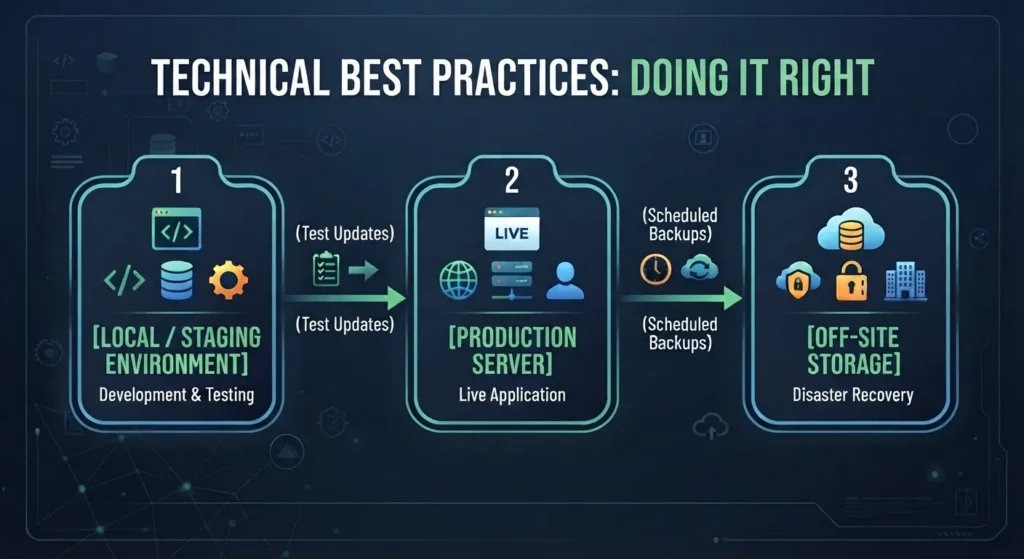
Never push updates—especially major CMS core versions, database migrations, or custom script changes—directly to a live production site. Always clone your live site to an isolated staging environment, apply updates, verify functionality, and then deploy to production.
Never push updates—especially major CMS core versions, database migrations, or custom script changes—directly to a live production site. Always clone your live site to an isolated staging environment, apply updates, verify functionality, and then deploy to production.

Automate Where Possible
Manually performing repetitive tasks introduces human error. Automate routine processes:
- Schedule automated off-site backups via server tools or managed host features.
- Set up automated uptime monitors (e.g., UptimeRobot, Pingdom) that trigger real-time SMS/Slack alerts during downtime.
- Use CI/CD pipelines for code deployments to maintain consistent code testing standards.

Maintain a Strict Backup Strategy
Follow the 3-2-1 backup rule: Maintain 3 copies of your site data, across 2 different storage media types, with at least 1 copy stored off-site. Always test restoring from backups periodically to confirm the recovery process actually works.